Tot
Personal desktop AI companion for chat, research, and local coding jobs with 3D personas. (Public Alpha)
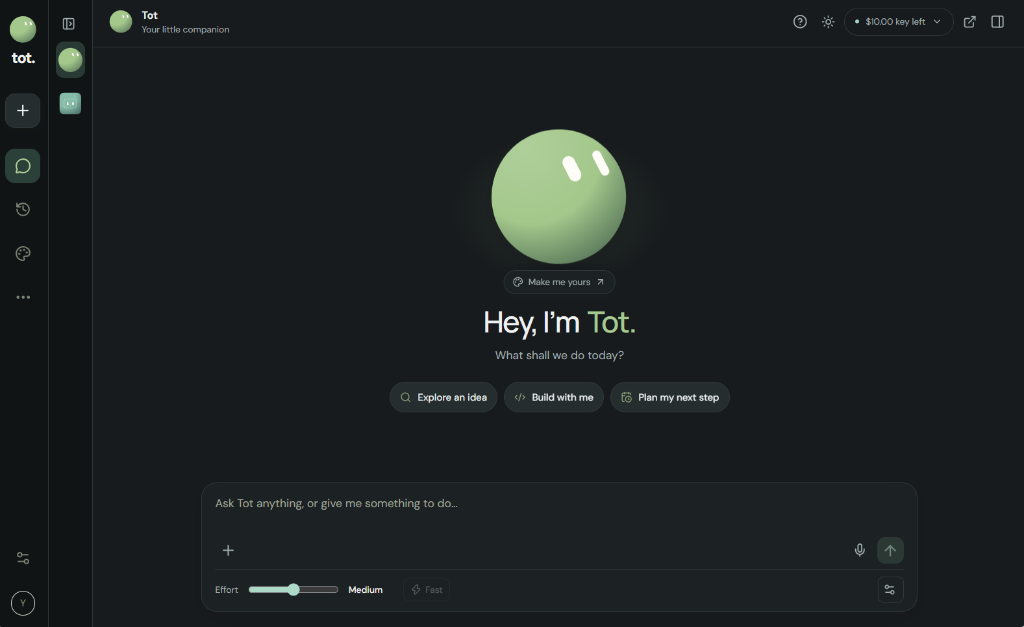
What is Tot?
Tot is an independent, local-first AI assistant built for Windows. Unlike browser-wrapped cloud interfaces, Tot lives directly on your desktop, understands your local project directories, and can help you research, write code, run commands, and organize tasks.
Read the build notes ↓Portable Windows release (v0.1.8). Free & unsigned — on first launch, click More info → Run anyway if SmartScreen prompts.
About this project
A local-first, approval-based desktop AI assistant built on Electron and Node.js, currently in Public Alpha (v0.1.8). Tot features customizable 3D character avatars with expressive eyes and floating companion mode, persistent memory, project file editing with undo backup, and PowerShell command execution with user approval. Zero telemetry, runs strictly on 127.0.0.1, and encrypts credentials locally on your machine.
Built with
How to use it
- Double-click .exe
- Launches Tot Public. No administrator permissions needed; runs in your user space.
- Bring Your Own Key
- Connect with your free or paid OpenRouter or Gemini API key. Free-only mode is enabled by default.
- Sidebar / Projects
- Open any local folder to give Tot access to read and edit project files with automatic backup.
- Command Approval
- Every PowerShell command requires your explicit review and one-click approval before running.
- Avatar Customizer
- Choose from 12 character shapes, 18 colors, eye styles, and toggle floating companion mode.
- Tray Icon
- Closing the window minimizes Tot to the Windows system tray. Right-click the tray icon to Quit.
Build notes.
What is Tot?
Tot is an independent, local-first AI assistant built for Windows. Unlike browser-wrapped cloud interfaces, Tot lives directly on your desktop, understands your local project directories, and can help you research, write code, run commands, and organize tasks.
It is designed with an approval-first security model: file modifications are backed up to a recoverable .tot-trash folder, and shell commands require explicit user consent before execution. The local server communicates solely via 127.0.0.1 with strict origin checks, ensuring web pages cannot hijack your assistant.
3D Companions & Expressive Avatars
AI assistants do not need to be boring text boxes. Tot features 12 character avatars, customizable eye designs, responsive animations, and a lightweight floating mode that can pin beside your IDE or browser.
Each persona can have its own personality traits, custom system instructions, and memory store, so you can build specialized companions for coding, writing, or researching.
Privacy & Zero Telemetry
No tracking, no analytics, no subscription harvesting. Your conversations, project paths, and configuration are saved strictly on your local machine in %APPDATA%\Tot Public.
API keys are encrypted using Windows DPAPI safe storage, and Tot never shares or transmits your credentials anywhere other than the official model providers you choose.
Quick Start & Windows SmartScreen
1. Download the ZIP from Google Drive and extract it to a permanent folder on your PC.
2. Run Tot-Public-0.1.8.exe. Because this is an independent, unsigned release, Windows SmartScreen will display a blue warning ('Windows protected your PC'). Simply click 'More info' and then 'Run anyway'.
3. Paste your free OpenRouter API key on the welcome screen. Free models are supported out of the box with zero costs.